> Explore Qdrant's agent skills catalog at https://skills.qdrant.tech/
> Search the documentation at https://skills.qdrant.tech/search?query=your+query+here
> Use this file to discover all available pages: https://qdrant.tech/llms.txt
# Consistency Guarantees
By default, Qdrant focuses on availability and maximum throughput of search operations, which is a preferable trade-off for most use cases. During normal operation, you can search and modify data from any peer in the cluster: reads use a partial fan-out strategy to optimize latency and availability, and writes execute in parallel on all active sharded replicas.
This means concurrent updates on one point can result in an inconsistent state. For example, if two clients simultaneously update the same point in a collection with three replicas per shard. On some replicas, the point may reflect the update from one client, while on other replicas, the point may reflect the update from the other client.
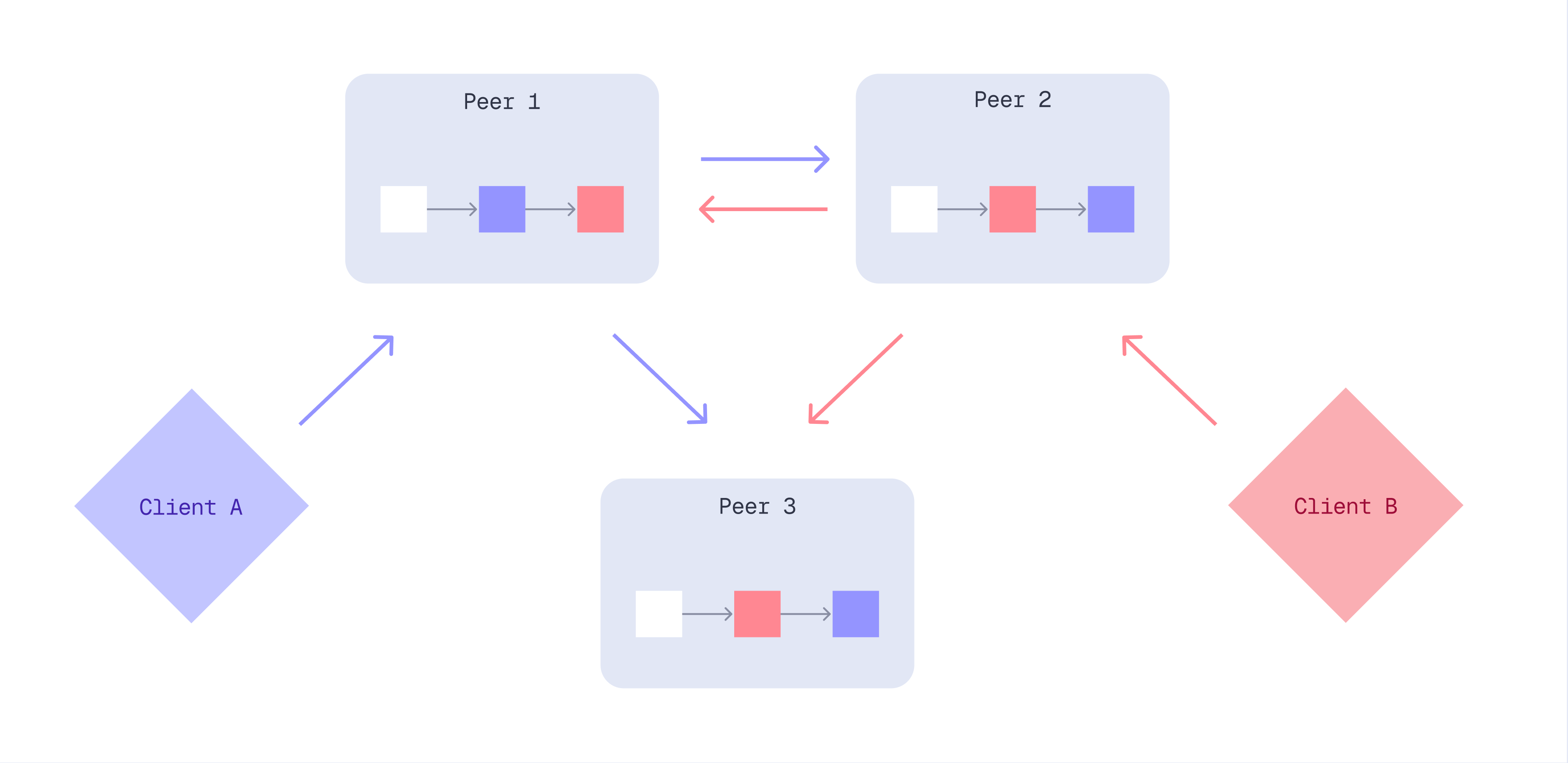
In some cases, it is necessary to ensure additional guarantees during possible hardware instabilities, mass concurrent updates of same documents, etc.
Qdrant provides a few options to control consistency guarantees:
- `write_consistency_factor` - defines the number of replicas that must acknowledge a write operation before responding to the client. Increasing this value will make write operations tolerant to network partitions in the cluster, but will require a higher number of replicas to be active to perform write operations.
- Read `consistency` param, can be used with search and retrieve operations to ensure that the results obtained from all replicas are the same. If this option is used, Qdrant will perform the read operation on multiple replicas and resolve the result according to the selected strategy. This option is useful to avoid data inconsistency in case of concurrent updates of the same documents. This options is preferred if the update operations are frequent and the number of replicas is low.
- Write `ordering` param, can be used with update and delete operations to ensure that the operations are executed in the same order on all replicas. If this option is used, Qdrant will route the operation to the leader replica of the shard and wait for the response before responding to the client. This option is useful to avoid data inconsistency in case of concurrent updates of the same documents. This options is preferred if read operations are more frequent than update and if search performance is critical.
## Write Consistency Factor
The `write_consistency_factor` represents the number of replicas that must acknowledge a write operation before responding to the client. It is set to 1 by default.
It can be configured at the collection's creation or when updating the
collection parameters.
This value can range from 1 to the number of replicas you have for each shard.
```http
PUT /collections/{collection_name}
{
"vectors": {
"size": 300,
"distance": "Cosine"
},
"shard_number": 6,
"replication_factor": 2,
"write_consistency_factor": 2
}
```
```python
from qdrant_client import QdrantClient, models
client.create_collection(
collection_name="{collection_name}",
vectors_config=models.VectorParams(size=300, distance=models.Distance.COSINE),
shard_number=6,
replication_factor=2,
write_consistency_factor=2,
)
```
```typescript
import { QdrantClient } from "@qdrant/js-client-rest";
client.createCollection("{collection_name}", {
vectors: {
size: 300,
distance: "Cosine",
},
shard_number: 6,
replication_factor: 2,
write_consistency_factor: 2,
});
```
```rust
use qdrant_client::qdrant::{CreateCollectionBuilder, Distance, VectorParamsBuilder};
use qdrant_client::Qdrant;
client
.create_collection(
CreateCollectionBuilder::new("{collection_name}")
.vectors_config(VectorParamsBuilder::new(300, Distance::Cosine))
.shard_number(6)
.replication_factor(2)
.write_consistency_factor(2),
)
.await?;
```
```java
import io.qdrant.client.QdrantClient;
import io.qdrant.client.QdrantGrpcClient;
import io.qdrant.client.grpc.Collections.CreateCollection;
import io.qdrant.client.grpc.Collections.Distance;
import io.qdrant.client.grpc.Collections.VectorParams;
import io.qdrant.client.grpc.Collections.VectorsConfig;
client
.createCollectionAsync(
CreateCollection.newBuilder()
.setCollectionName("{collection_name}")
.setVectorsConfig(
VectorsConfig.newBuilder()
.setParams(
VectorParams.newBuilder()
.setSize(300)
.setDistance(Distance.Cosine)
.build())
.build())
.setShardNumber(6)
.setReplicationFactor(2)
.setWriteConsistencyFactor(2)
.build())
.get();
```
```csharp
using Qdrant.Client;
using Qdrant.Client.Grpc;
await client.CreateCollectionAsync(
collectionName: "{collection_name}",
vectorsConfig: new VectorParams { Size = 300, Distance = Distance.Cosine },
shardNumber: 6,
replicationFactor: 2,
writeConsistencyFactor: 2
);
```
```go
import (
"context"
"github.com/qdrant/go-client/qdrant"
)
client.CreateCollection(context.Background(), &qdrant.CreateCollection{
CollectionName: "{collection_name}",
VectorsConfig: qdrant.NewVectorsConfig(&qdrant.VectorParams{
Size: 300,
Distance: qdrant.Distance_Cosine,
}),
ShardNumber: qdrant.PtrOf(uint32(6)),
ReplicationFactor: qdrant.PtrOf(uint32(2)),
WriteConsistencyFactor: qdrant.PtrOf(uint32(2)),
})
```
Write operations will fail if the number of active replicas is less than the
`write_consistency_factor`. In this case, the client is expected to send the
operation again to ensure a consistent state is reached.
Setting the `write_consistency_factor` to a lower value may allow accepting
writes even if there are unresponsive nodes. Unresponsive nodes are marked as
dead and will automatically be recovered once available to ensure data
consistency.
The configuration of the `write_consistency_factor` is important for adjusting the cluster's behavior when some nodes go offline due to restarts, upgrades, or failures.
By default, the cluster continues to accept updates as long as at least one replica of each shard is online. However, this behavior means that once an offline replica is restored, it will require additional synchronization with the rest of the cluster. In some cases, this synchronization can be resource-intensive and undesirable.
Setting the `write_consistency_factor` to match the replication factor modifies the cluster's behavior so that unreplicated updates are rejected, preventing the need for extra synchronization.
If the update is applied to enough replicas - according to the `write_consistency_factor` - the update will return a successful status. Any replicas that failed to apply the update will be temporarily disabled and are automatically recovered to keep data consistency. If the update could not be applied to enough replicas, it'll return an error and may be partially applied. The user must submit the operation again to ensure data consistency.
For asynchronous updates and injection pipelines capable of handling errors and retries, this strategy might be preferable.
## Read Consistency
Read `consistency` can be specified for most read requests and will ensure that the returned result
is consistent across cluster nodes.
- `all` will query all nodes and return points, which present on all of them
- `majority` will query all nodes and return points, which present on the majority of them
- `quorum` will query randomly selected majority of nodes and return points, which present on all of them
- `1`/`2`/`3`/etc - will query specified number of randomly selected nodes and return points which present on all of them
- default `consistency` is `1`
```http
POST /collections/{collection_name}/points/query?consistency=majority
{
"query": [0.2, 0.1, 0.9, 0.7],
"filter": {
"must": [
{
"key": "city",
"match": {
"value": "London"
}
}
]
},
"params": {
"hnsw_ef": 128,
"exact": false
},
"limit": 3
}
```
```python
from qdrant_client import QdrantClient, models
client.query_points(
collection_name="{collection_name}",
query=[0.2, 0.1, 0.9, 0.7],
query_filter=models.Filter(
must=[
models.FieldCondition(
key="city",
match=models.MatchValue(
value="London",
),
)
]
),
search_params=models.SearchParams(hnsw_ef=128, exact=False),
limit=3,
consistency="majority",
)
```
```typescript
import { QdrantClient } from "@qdrant/js-client-rest";
client.query("{collection_name}", {
query: [0.2, 0.1, 0.9, 0.7],
filter: {
must: [{ key: "city", match: { value: "London" } }],
},
params: {
hnsw_ef: 128,
exact: false,
},
limit: 3,
consistency: "majority",
});
```
```rust
use qdrant_client::qdrant::{
read_consistency::Value, Condition, Filter, QueryPointsBuilder, ReadConsistencyType,
SearchParamsBuilder,
};
use qdrant_client::Qdrant;
client
.query(
QueryPointsBuilder::new("{collection_name}")
.query(vec![0.2, 0.1, 0.9, 0.7])
.limit(3)
.filter(Filter::must([Condition::matches(
"city",
"London".to_string(),
)]))
.params(SearchParamsBuilder::default().hnsw_ef(128).exact(false))
.read_consistency(Value::Type(ReadConsistencyType::Majority.into())),
)
.await?;
```
```java
import io.qdrant.client.QdrantClient;
import io.qdrant.client.QdrantGrpcClient;
import io.qdrant.client.grpc.Common.Filter;
import io.qdrant.client.grpc.Points.QueryPoints;
import io.qdrant.client.grpc.Points.ReadConsistency;
import io.qdrant.client.grpc.Points.ReadConsistencyType;
import io.qdrant.client.grpc.Points.SearchParams;
import static io.qdrant.client.QueryFactory.nearest;
import static io.qdrant.client.ConditionFactory.matchKeyword;
client.queryAsync(
QueryPoints.newBuilder()
.setCollectionName("{collection_name}")
.setFilter(Filter.newBuilder().addMust(matchKeyword("city", "London")).build())
.setQuery(nearest(.2f, 0.1f, 0.9f, 0.7f))
.setParams(SearchParams.newBuilder().setHnswEf(128).setExact(false).build())
.setLimit(3)
.setReadConsistency(
ReadConsistency.newBuilder().setType(ReadConsistencyType.Majority).build())
.build())
.get();
```
```csharp
using Qdrant.Client;
using Qdrant.Client.Grpc;
using static Qdrant.Client.Grpc.Conditions;
await client.QueryAsync(
collectionName: "{collection_name}",
query: new float[] { 0.2f, 0.1f, 0.9f, 0.7f },
filter: MatchKeyword("city", "London"),
searchParams: new SearchParams { HnswEf = 128, Exact = false },
limit: 3,
readConsistency: new ReadConsistency { Type = ReadConsistencyType.Majority }
);
```
```go
import (
"context"
"github.com/qdrant/go-client/qdrant"
)
client.Query(context.Background(), &qdrant.QueryPoints{
CollectionName: "{collection_name}",
Query: qdrant.NewQuery(0.2, 0.1, 0.9, 0.7),
Filter: &qdrant.Filter{
Must: []*qdrant.Condition{
qdrant.NewMatch("city", "London"),
},
},
Params: &qdrant.SearchParams{
HnswEf: qdrant.PtrOf(uint64(128)),
},
Limit: qdrant.PtrOf(uint64(3)),
ReadConsistency: qdrant.NewReadConsistencyType(qdrant.ReadConsistencyType_Majority),
})
```
### Read Affinity
*Available as of v1.19.0*
Read `consistency` resolves inconsistencies by querying multiple replicas and comparing their results, at the cost of extra load. When you only need repeated reads to stay stable for a given client, read affinity is a lighter-weight alternative.
By default, Qdrant reads from a single replica of each shard, preferring a local replica if one exists and otherwise picking a remote replica. In a multi-replica cluster, this means successive reads for the same query can land on different replicas. When updates are still propagating, a point may already be visible on one replica but not yet on another. Reads that bounce between replicas then "blink": a point appears, disappears, and reappears across otherwise identical requests. This is especially noticeable when [`prevent_unoptimized`](https://qdrant.tech/documentation/ops-optimization/optimizer/index.md#prevent-reads-from-large-unindexed-segments) is enabled, since points held back until a segment is optimized become visible on each replica at slightly different times.
To keep reads stable, send the `X-Qdrant-Route-Affinity` HTTP header with a stable value, such as a user ID, session ID, or hashed API key. Qdrant hashes this value and deterministically pins every request carrying the same value to the same replica. Because the hash is computed identically on every node, all peers resolve a given value to the same replica, so a client consistently reads from one replica and no longer experiences blinking. Different values are spread across replicas, so read load is still balanced across users. The same key can be set as gRPC metadata.
```bash
curl -X POST http://localhost:6333/collections/{collection_name}/points/query \
--header 'api-key: your_api_key_here' \
--header 'X-Qdrant-Route-Affinity: user-42' \
--header 'Content-Type: application/json' \
--data '{
"query": [0.2, 0.1, 0.9, 0.7],
"limit": 3
}'
```
```python
from qdrant_client import QdrantClient
from qdrant_client.context_headers import headers
with headers({"X-Qdrant-Route-Affinity": "user-42"}):
client.query_points(
collection_name="{collection_name}",
query=[0.2, 0.1, 0.9, 0.7],
limit=3,
)
```
```typescript
import { QdrantClient, withHeaders } from "@qdrant/js-client-rest";
const result = await withHeaders({ "X-Qdrant-Route-Affinity": "user-42" }, () =>
client.query("{collection_name}", {
query: [0.2, 0.1, 0.9, 0.7],
limit: 3,
})
);
```
```rust
use qdrant_client::qdrant::QueryPointsBuilder;
use qdrant_client::Qdrant;
client
.with_header("X-Qdrant-Route-Affinity", "user-42")
.query(
QueryPointsBuilder::new("{collection_name}")
.query(vec![0.2, 0.1, 0.9, 0.7])
.limit(3),
)
.await?;
```
```java
import io.qdrant.client.QdrantClient;
import io.qdrant.client.QdrantGrpcClient;
import io.qdrant.client.RequestHeaders;
import io.qdrant.client.grpc.Points.QueryPoints;
import io.grpc.Context;
import static io.qdrant.client.QueryFactory.nearest;
Context ctx = RequestHeaders.withHeader(
Context.current(), "X-Qdrant-Route-Affinity", "user-42");
ctx.run(() -> client.queryAsync(
QueryPoints.newBuilder()
.setCollectionName("{collection_name}")
.setQuery(nearest(0.2f, 0.1f, 0.9f, 0.7f))
.setLimit(3)
.build()));
```
```csharp
using Qdrant.Client;
using (RequestHeaders.Use("X-Qdrant-Route-Affinity", "user-42"))
await client.QueryAsync(
collectionName: "{collection_name}",
query: new float[] { 0.2f, 0.1f, 0.9f, 0.7f },
limit: 3);
```
```go
import (
"context"
"github.com/qdrant/go-client/qdrant"
)
ctx := qdrant.WithHeader(context.Background(), "X-Qdrant-Route-Affinity", "user-42")
client.Query(ctx, &qdrant.QueryPoints{
CollectionName: "{collection_name}",
Query: qdrant.NewQuery(0.2, 0.1, 0.9, 0.7),
Limit: qdrant.PtrOf(uint64(3)),
})
```
When the header is absent or empty, routing falls back to the default local-preferred behavior. When it is set, local-replica preference is intentionally disabled, otherwise each node would answer from its own copy and the value would have no effect.
## Write Ordering
Write `ordering` can be specified for any write request to serialize it through a single "leader" node,
which ensures that all write operations (issued with the same `ordering`) are performed and observed
sequentially.
- `weak` _(default)_ ordering does not provide any additional guarantees, so write operations can be freely reordered.
- `medium` ordering serializes all write operations through a dynamically elected leader, which might cause minor inconsistencies in case of leader change.
- `strong` ordering serializes all write operations through the permanent leader, which provides strong consistency, but write operations may be unavailable if the leader is down.
```http
PUT /collections/{collection_name}/points?ordering=strong
{
"batch": {
"ids": [1, 2, 3],
"payloads": [
{"color": "red"},
{"color": "green"},
{"color": "blue"}
],
"vectors": [
[0.9, 0.1, 0.1],
[0.1, 0.9, 0.1],
[0.1, 0.1, 0.9]
]
}
}
```
```python
from qdrant_client import QdrantClient, models
client.upsert(
collection_name="{collection_name}",
points=models.Batch(
ids=[1, 2, 3],
payloads=[
{"color": "red"},
{"color": "green"},
{"color": "blue"},
],
vectors=[
[0.9, 0.1, 0.1],
[0.1, 0.9, 0.1],
[0.1, 0.1, 0.9],
],
),
ordering=models.WriteOrdering.STRONG,
)
```
```typescript
import { QdrantClient } from "@qdrant/js-client-rest";
client.upsert("{collection_name}", {
batch: {
ids: [1, 2, 3],
payloads: [{ color: "red" }, { color: "green" }, { color: "blue" }],
vectors: [
[0.9, 0.1, 0.1],
[0.1, 0.9, 0.1],
[0.1, 0.1, 0.9],
],
},
ordering: "strong",
});
```
```rust
use qdrant_client::qdrant::{
PointStruct, UpsertPointsBuilder, WriteOrdering, WriteOrderingType,
};
use qdrant_client::Qdrant;
client
.upsert_points(
UpsertPointsBuilder::new(
"{collection_name}",
vec![
PointStruct::new(1, vec![0.9, 0.1, 0.1], [("color", "red".into())]),
PointStruct::new(2, vec![0.1, 0.9, 0.1], [("color", "green".into())]),
PointStruct::new(3, vec![0.1, 0.1, 0.9], [("color", "blue".into())]),
],
)
.ordering(WriteOrdering {
r#type: WriteOrderingType::Strong.into(),
}),
)
.await?;
```
```java
import java.util.List;
import java.util.Map;
import static io.qdrant.client.PointIdFactory.id;
import static io.qdrant.client.ValueFactory.value;
import static io.qdrant.client.VectorsFactory.vectors;
import io.qdrant.client.QdrantClient;
import io.qdrant.client.QdrantGrpcClient;
import io.qdrant.client.grpc.Points.PointStruct;
import io.qdrant.client.grpc.Points.UpsertPoints;
import io.qdrant.client.grpc.Points.WriteOrdering;
import io.qdrant.client.grpc.Points.WriteOrderingType;
client
.upsertAsync(
UpsertPoints.newBuilder()
.setCollectionName("{collection_name}")
.addAllPoints(
List.of(
PointStruct.newBuilder()
.setId(id(1))
.setVectors(vectors(0.9f, 0.1f, 0.1f))
.putAllPayload(Map.of("color", value("red")))
.build(),
PointStruct.newBuilder()
.setId(id(2))
.setVectors(vectors(0.1f, 0.9f, 0.1f))
.putAllPayload(Map.of("color", value("green")))
.build(),
PointStruct.newBuilder()
.setId(id(3))
.setVectors(vectors(0.1f, 0.1f, 0.9f))
.putAllPayload(Map.of("color", value("blue")))
.build()))
.setOrdering(WriteOrdering.newBuilder().setType(WriteOrderingType.Strong).build())
.build())
.get();
```
```csharp
using Qdrant.Client;
using Qdrant.Client.Grpc;
await client.UpsertAsync(
collectionName: "{collection_name}",
points: new List
{
new()
{
Id = 1,
Vectors = new[] { 0.9f, 0.1f, 0.1f },
Payload = { ["color"] = "red" }
},
new()
{
Id = 2,
Vectors = new[] { 0.1f, 0.9f, 0.1f },
Payload = { ["color"] = "green" }
},
new()
{
Id = 3,
Vectors = new[] { 0.1f, 0.1f, 0.9f },
Payload = { ["color"] = "blue" }
}
},
ordering: WriteOrderingType.Strong
);
```
```go
import (
"context"
"github.com/qdrant/go-client/qdrant"
)
client.Upsert(context.Background(), &qdrant.UpsertPoints{
CollectionName: "{collection_name}",
Points: []*qdrant.PointStruct{
{
Id: qdrant.NewIDNum(1),
Vectors: qdrant.NewVectors(0.9, 0.1, 0.1),
Payload: qdrant.NewValueMap(map[string]any{"color": "red"}),
},
{
Id: qdrant.NewIDNum(2),
Vectors: qdrant.NewVectors(0.1, 0.9, 0.1),
Payload: qdrant.NewValueMap(map[string]any{"color": "green"}),
},
{
Id: qdrant.NewIDNum(3),
Vectors: qdrant.NewVectors(0.1, 0.1, 0.9),
Payload: qdrant.NewValueMap(map[string]any{"color": "blue"}),
},
},
Ordering: &qdrant.WriteOrdering{
Type: qdrant.WriteOrderingType_Strong,
},
})
```